The Uncanny Valley of Furniture Images: Why Some AI Images Feel 'Off' and How to Fix It
A detailed breakdown of the most common AI rendering problems in furniture imagery—and practical approaches to fix them.
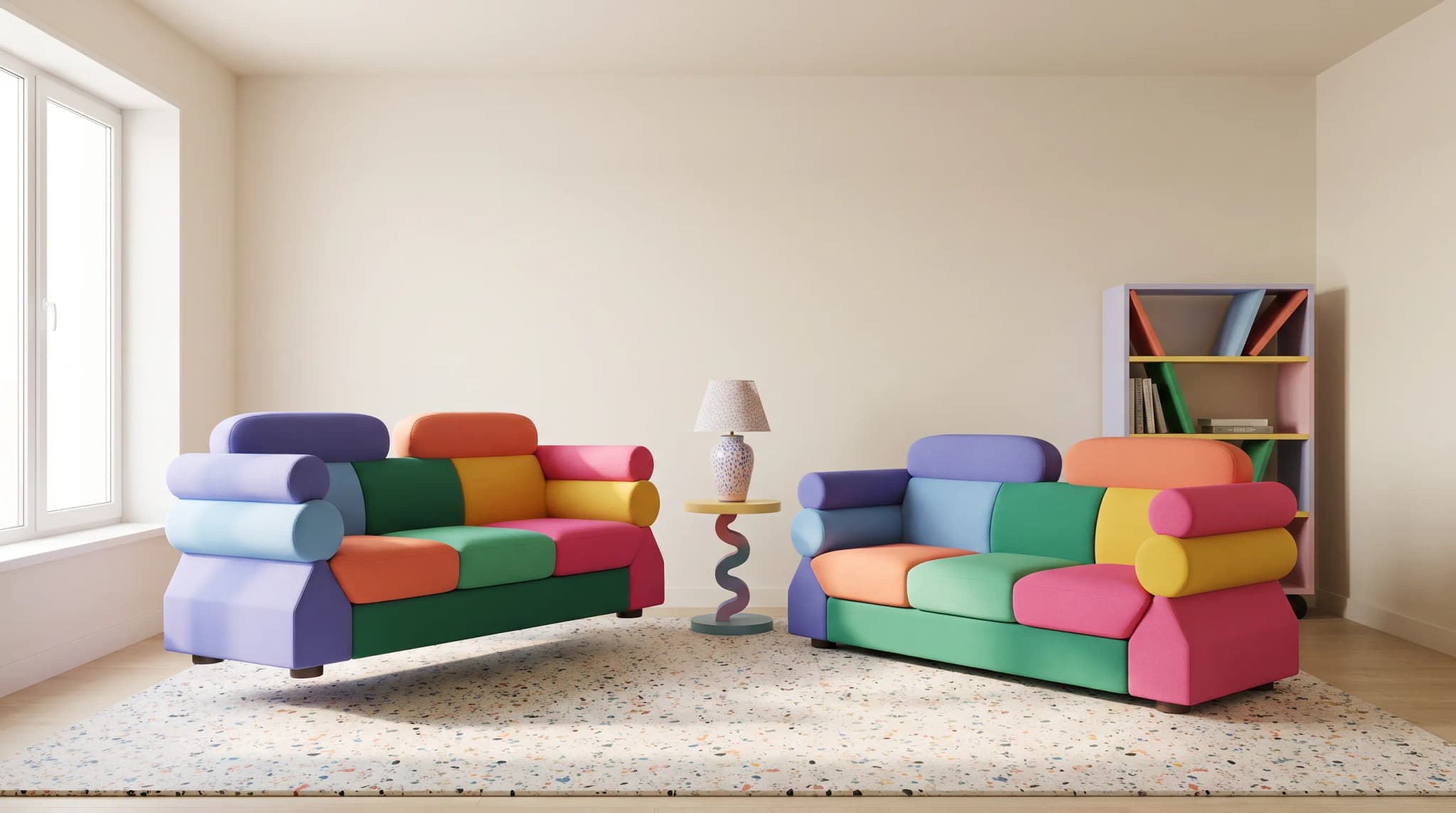
General-purpose AI image tools weren't built for furniture. The sofa floats slightly above the floor. The wood grain repeats. The shadows don't match the light source. Buyers may not consciously identify what's wrong, but they register that something feels off—and that costs conversions.
Furniture Connect is purpose-built to eliminate these failure modes. Our pipeline is engineered specifically around the categories where generic models break: ground contact, light consistency, material realism, scale accuracy, and underrepresented furniture types. The result is imagery that reads as genuine product photography across every furniture category—not just the common ones.
A clarifying note up front: Furniture Connect is not a CAD or 3D modeling tool. We don't sculpt geometry from scratch, and we don't export .OBJ, .FBX, or .GLB files—because we're not solving the design or engineering problem. We're solving the catalog-imagery problem. (For a fuller comparison, see Furniture Connect vs CAD Tools.)
Below is a detailed breakdown of where general-purpose AI tools fail on furniture rendering, and how Furniture Connect solves each one.
Problem 1: Impossible Physics
The Floating Furniture Effect
General-purpose AI models often struggle with ground contact. Furniture appears to hover millimeters above the floor, or contact shadows are missing entirely. Sometimes legs penetrate the ground plane slightly. These errors are small but immediately perceptible.
The fix: Furniture Connect resolves ground contact automatically during generation, anchoring pieces to the floor with physically consistent contact shadows. If you're using a general-purpose tool, you'll need to review the base of every piece, add contact shadows manually, and regenerate the floor contact zone until it reads as real.
Light Source Conflicts
A piece might show shadows suggesting a window to the left while highlights indicate lighting from above and right. General-purpose AI models sometimes composite lighting from multiple reference images without resolving the physics. Furniture Connect enforces a single, consistent light direction across the scene as part of generation.
The fix: Before generating, specify your light source direction clearly in the prompt. After generating, check that all shadows point consistently in one direction. Reject images where the light logic doesn't hold.
Structural Impossibilities
Drawers that couldn't open because they'd hit an adjacent element. Chair legs at angles that would collapse under weight. Shelves that couldn't support anything. Generic AI doesn't understand structural engineering—Furniture Connect's category-aware pipeline preserves the structural logic of the source product so the rendered piece could actually be built.
The fix: Review every generated image with a furniture maker's eye. Ask: could this actually be built? Would it function? Would it stand? If not, regenerate.
Problem 2: Material Inaccuracies
The Too-Perfect Wood Problem
Real wood has irregularities—knots, grain variation, color shifts between boards. Wood generated by general-purpose AI often looks like a tiled texture: repetitive patterns, uniform color, and suspiciously perfect grain flow. Furniture Connect produces natural grain variation by default.
The fix: Use reference images of actual wood species in your prompts. Request "natural variation" and "visible grain irregularities." Post-generation, look for repeated patterns—these are tells. For high-value pieces, photograph real samples and composite them.
Fabric That Doesn't Behave
Upholstery should show tension, compression, and drape. Generic AI renders often produce fabric that looks spray-painted on—no wrinkles at stress points, no pillowing where cushions meet, no natural settling. Furniture Connect renders fabric with realistic cushion compression and natural drape.
The fix: Include prompts about fabric behavior: "natural cushion compression," "slight wrinkling at seams," "relaxed back cushions." Reference real photographs of similar upholstery styles.
Metal and Reflective Surfaces
Chrome, brass, and polished steel should reflect the environment around them. General-purpose AI often renders these as flat metallic colors or with reflections that don't match the scene. Furniture Connect generates furniture and environment together so reflections are physically consistent with the room.
The fix: Generate furniture and environment together so reflections have something to reflect. Specify the finish type precisely: "brushed nickel" behaves differently than "polished chrome." For product silhouettes on white backgrounds, reflective materials are easier to photograph than generate.
Problem 3: Scale and Proportion Errors
Objects That Don't Match
A dining table that would seat twelve in the image but is labeled as seating four. A coffee table that's clearly taller than the adjacent sofa seat. Door handles the size of dinner plates. Generic AI struggles with absolute scale; Furniture Connect honors the dimensions of the source product so scale stays accurate across every generated scene.
The fix: Include scale references in your prompts—human figures, standard objects, or specific dimensions. After generation, mentally populate the scene: could a person actually sit in that chair? Use that desk? Walk through that doorway?
Internal Proportions Gone Wrong
Chair arms at elbow height for a giant. Desk drawers too shallow to hold a pencil. Shelves with spacing that accommodates nothing useful. The external dimensions might be correct while internal relationships are completely wrong.
The fix: Reference actual furniture specifications when prompting. Better yet, use CAD-based visualization tools for products where precise dimensions matter, and reserve AI for lifestyle contexts.
Problem 4: Environmental Inconsistencies
Rooms That Don't Exist
Windows looking out on impossible views. Doorways leading to nowhere. Architectural elements that couldn't be built. Walls that change angle mid-surface. Generic AI can generate environments that look plausible at first glance but crumble under scrutiny. Furniture Connect's environments are built from architecturally coherent room layouts.
The fix: Reference real architectural styles and room layouts. Examine backgrounds carefully—viewers often notice these errors subconsciously. For important images, trace the walls and verify the space makes architectural sense.
Styling That Contradicts
Mid-century modern furniture in a Victorian room. Industrial pieces against Tuscan villa backgrounds. Generic AI may not recognize style clashes that would be obvious to any designer.
The fix: Be explicit about design style in your prompts. Use period-appropriate reference images. Have someone with design training review generated lifestyle imagery before publication.
For a repeatable approach to room scenes, use the catalog-scale lifestyle imagery workflow to keep briefs and approvals consistent across products.
Problem 5: The Training Data Gap
Why Some Furniture Types Look More "AI" Than Others
Not all furniture categories render equally well. Gaming chairs, massage recliners, bespoke designer pieces, and other specialized items often look noticeably more artificial than common furniture like sofas or dining tables.
The reason is training data. AI models learn from millions of images, but the distribution isn't even. Standard furniture—beds, sofas, basic chairs—appears in countless real photographs. These models have seen genuine oak dining tables in thousands of variations, so they understand how light interacts with real wood, how fabric drapes on actual cushions.
Specialized furniture is different. Gaming chairs, for instance, appear far less frequently in photographic datasets. Much of what the AI has learned about these items comes from CGI renders—marketing materials, game assets, 3D product visualizations. The model is essentially learning to replicate CGI rather than reality.
The result: when you ask an AI to generate a gaming chair, it produces something that looks like a render of a gaming chair—because that's what it was trained on. The plastic looks too smooth, the stitching too uniform, the overall appearance too "digital." The AI isn't failing; it's successfully reproducing its training data. The problem is that training data wasn't real.
The fix: Furniture Connect addresses this through specialized techniques that improve realism for underrepresented furniture categories. Rather than relying solely on general-purpose models, we apply targeted refinements that push outputs toward photorealism even when the underlying training data skews toward CGI. The result is images that read as genuine photographs across all furniture types—not just the common ones.
Building a Quality Control Process
These errors aren't inevitable. They're predictable, which means they're preventable—and Furniture Connect prevents them at generation time rather than asking you to catch them after the fact. Every image runs through the same checks an experienced reviewer would apply:
- Physics check: Does everything touch the ground correctly? Do shadows and highlights agree on where light comes from? Could this object physically exist?
- Material check: Does wood look like real wood? Does fabric behave like fabric? Do reflections reflect something real?
- Scale check: Could a human use this furniture comfortably? Do internal proportions make functional sense?
- Environment check: Could this room exist? Does the style match the furniture? Are there any architectural impossibilities?
With general-purpose AI tools, this is manual work for every image. With Furniture Connect, it's the default.
Use these failure modes when testing vendors against the AI image-platform evaluation checklist.
The Goal: Invisible AI
The best AI imagery doesn't call attention to itself. It supports the product without triggering that uncanny valley response. Buyers should focus on the furniture, not wonder whether the image is real.
Generic AI image tools can produce the occasional convincing furniture shot, but the failure modes above show up often enough to erode trust at scale. Furniture Connect is built specifically to close that gap—delivering photoreal furniture imagery that holds up across every SKU, every category, and every scene, without per-image manual cleanup.
And unlike using OpenAI, Gemini, or other general-purpose tools directly, Furniture Connect customers work with a real team focused on maximising the value your team gets out of the platform. We help write and refine prompts for your specific catalog, advise on the right approach for tricky categories, and provide hands-on support when an image needs another pass. That human layer—furniture experts working alongside the AI—is something you can't get from a general-purpose model, and it's why our customers ship production-ready imagery instead of spending weeks learning prompt engineering.
The guide to how AI furniture photography works follows the process from accurate reference through human approval.
Frequently asked questions
Why do AI-generated furniture images look off?
Usually because of small physical errors buyers register without naming them. Furniture hovers millimeters above the floor or lacks contact shadows. Shadows imply a window on the left while highlights come from above right. Wood grain repeats like a tiled texture. Upholstery looks spray-painted on, with no compression where cushions meet. Chrome reflects nothing. A coffee table stands taller than the sofa seat. General-purpose image tools weren't built for furniture, and those failure modes show up often enough to erode trust at scale.
Why do some furniture types, like gaming chairs, look more artificial in AI images?
Training data. Standard furniture such as beds, sofas and oak dining tables appears in countless real photographs, so models understand how light hits real wood and how fabric drapes on cushions. Gaming chairs, massage recliners and bespoke designer pieces appear far less often, and much of what the model learned about them came from CGI renders, marketing materials and game assets. The model faithfully reproduces that, so the plastic looks too smooth and the stitching too uniform. It isn't failing; its reference wasn't real.
How do I check AI furniture renders before publishing them?
Run four checks on every image. Physics: does everything touch the ground, do shadows and highlights agree on one light source, and could the object physically exist? Material: does wood show natural irregularity, does fabric show tension and drape, do reflections reflect something real? Scale: could a person sit in that chair or use that desk, and do internal proportions like drawer depth make functional sense? Environment: could the room be built, and does its style match the furniture? Reject anything that fails.
How does Furniture Connect avoid the uncanny valley in furniture imagery?
By handling the failure modes at generation time instead of asking you to catch them afterward. The pipeline anchors pieces to the floor with consistent contact shadows, enforces a single light direction, produces natural grain variation and realistic cushion compression, generates furniture and environment together so reflections are physically consistent, honors the source product's dimensions, and applies targeted refinements for underrepresented categories. Customers also get a team that helps write and refine prompts for tricky categories. It is not a CAD or 3D modeling tool.
Ready to showcase your furniture with imagery that converts? Talk to our team and connect with buyers who are actively sourcing.